Prepare your AI car reveal for TikTok or Reels
Download the MP4, preserve the car transition, choose your framing and add permitted music before posting.
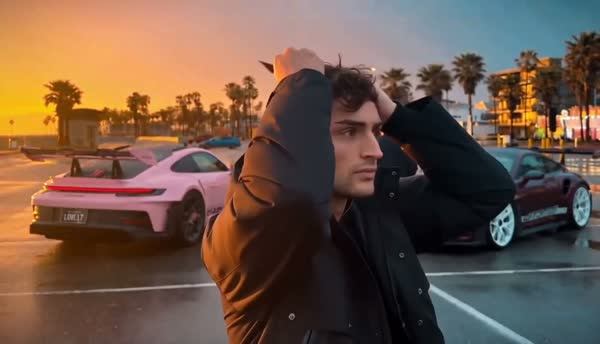
Save the original MP4 first
Open the completed order in My videos and choose Download video. Keep the original file before making edits or exporting a new version. The studio keeps download access for 30 days, so save a local copy while it is available.
Play the downloaded file all the way through. Check that the opening, the cards covering the lens, the car appearance and the final pose are present. If the file is corrupt or incomplete, contact support with your order number rather than purchasing another generation to replace a delivery problem.
Keep the reveal visible when changing the frame
The delivered clip is 16:9 landscape. A vertical crop removes material from the sides, which can cut off cars or part of the card movement. Before committing to a crop, scrub through the whole transition in your editor.
One alternative is to place the entire landscape video inside a vertical canvas. You can use a plain background and a short caption above or below it, leaving the person and cars visible. The studio does not export a separate vertical version, so any crop or canvas layout happens in your editing app.
Add music you are allowed to use
The download does not include the Unforgettable song. Add suitable audio through the publishing app or another source that grants permission for your intended use. Account type, region and commercial use can affect which audio is available and permitted.
Preview where the musical change falls against the cards covering the camera and the cars appearing. Make the adjustment in your editor, then replay the whole clip. An audio track that sounds good at the opening can still end awkwardly if it is cut without a final preview.
Keep the caption clear about what viewers are seeing
A short caption can explain that this is an AI car reveal made from a portrait. Avoid implying that the generated cars are a real purchase or that the scene documents an actual event if that is not true. Use the destination platform’s current AI-content disclosure controls where applicable.
Leave important text clear of the face and the cards. Preview the post inside the publishing app, where interface buttons and captions may cover part of the image. You can keep the text brief and let the reveal carry the post.
Run a final preview before publishing
Watch the exact exported file you intend to upload, with sound on and then off. A clean source MP4 can still be changed by an export setting, crop or audio edit. Check the posted draft on a phone-size screen before you publish.
- The face, cards and cars remain visible throughout the transition.
- The audio is permitted for the account and use, and ends cleanly.
- Captions are readable and do not obscure the reveal.
- The description and AI-content disclosure accurately describe the clip.
- A copy of the original MP4 is saved outside the studio.
Ready for your own reveal?
Watch the full example, choose a portrait and review your pack before payment.
Upload my photo ↗