A CapCut or Kling alternative: one photo, no timeline
How this car reveal differs from building the same trend in CapCut or Kling. One portrait, no editor project, a fixed 12-second MP4.
What CapCut and Kling are for
CapCut is a video editor. People use it to cut clips, crop a frame, and add captions or music. Kling is an AI video tool. People use it to prompt a clip, sometimes from a template or a reference image. Either one can be part of posting a car reveal.
This studio is not CapCut and not Kling. It is not affiliated with either product, and it does not sign you into those apps. If a page elsewhere says “CapCut template” or “Kling template” for this trend, that is their editor or their model, not a project file from here.
What you do here instead of editing
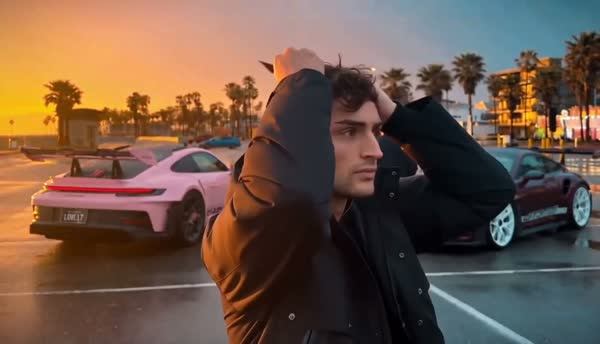
You upload one portrait. You do not open a timeline, place keyframes, or write the generation prompt. The golden-hour template is fixed: UNO cards 2 and 4 cover the lens, then both sports cars are in the lot. You choose 480p or 720p, and you choose 16:9 or 9:16.
Starter is one 480p video for $4.99. Plus is $9.99 and is either three 480p videos or two 720p videos. Those are one-time PayPal pack purchases. There is no subscription. A saved draft does not charge you. One pack credit generates one video.
What the download is not
You do not get a CapCut project, a Kling project, or an editable timeline. You cannot move the cut, change the card timing, or drop the Unforgettable song into the file inside this studio. The download is a 12-second MP4 with no soundtrack.
9:16 is a requested vertical frame of the same golden-hour scene. It is not a separate crop project, and it is not a watermarked preview. The homepage example is the 16:9 landscape result. A vertical frame can crop the sides of that scene. There is no free preview render before you spend a credit.
When an editor is still the right tool
Download the MP4 and use CapCut, or any other editor you prefer, if you need to trim, caption, or place the clip inside a longer post. Add audio you are allowed to use. Account type, region, and commercial use can change which tracks those apps permit.
If you need a custom prompt, a different car, or a scene this template does not contain, this studio is the wrong tool. It makes one specific reveal from one photo. It will not turn the yellow-car inspiration clip into your video, and it will not generate only one of the two golden-hour cars.
Check this before you pay
Watch the full homepage example, including the moment the cards cover the lens and the moment the cars appear. Use a clear photo of one adult. JPG, PNG, or WebP, up to 10 MB. The photo you select stays in place if you sign in with email on the same page.
A failed generation returns its video credit. A completed video you want to remake uses another credit. Downloads stay available for 30 days, so keep your own copy. AI can change the face, hands, clothes, card numbers, and motion.
- Confirm you want this fixed golden-hour scene, not a custom edit.
- Choose 16:9 or 9:16, then 480p or 720p.
- Pay for a pack only after the draft shows the photo and frame you intended.
- Add permitted audio in the app where you post.
Ready for your own reveal?
Watch the full example, choose a portrait and review your pack before payment.
Upload my photo ↗